
Think in code. Publish clean code.
Git Shadow introduces the Shadow Branch Pattern, a Git workflow that lets developers keep local thinking artifacts (comments, notes, exploration code) without polluting the shared repository.
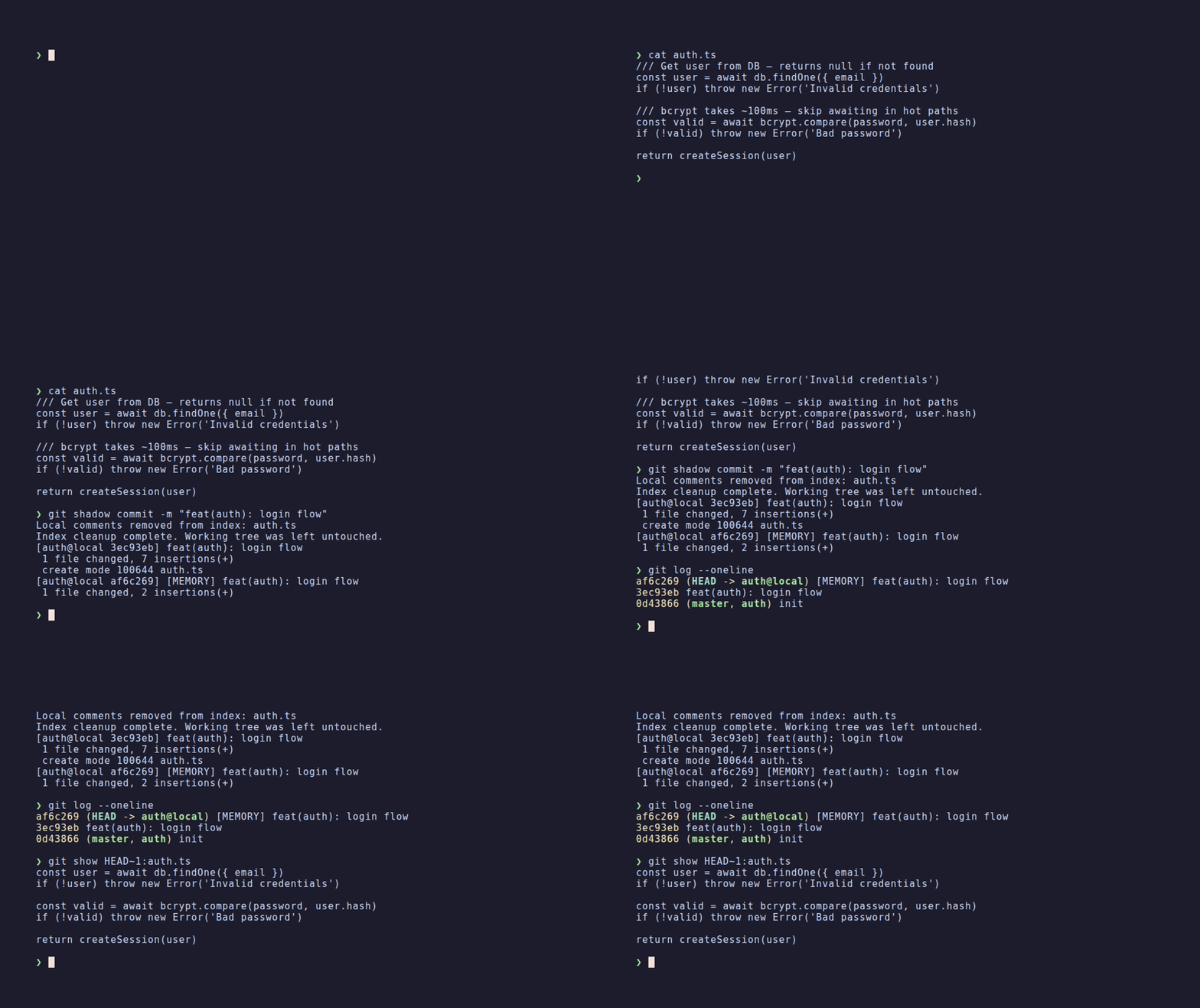


This toolkit provides a small set of commands and hooks that create a shadow branch workflow:
feature/login@local   ← local thinking layer
feature/login         ← collaboration layer push to the remote repository
Your local branch can contain:
- design comments
- algorithm sketches
- architecture notes
- debugging helpers
- AI memory files
But the published branch remains clean and reviewable.
The result: Write the comments, structure and tools you need to think. Publish only the code your team needs to read.
Software development involves two different layers:
- Code for collaboration — the code shared with the team, reviewed, and maintained over time.
- Code for thinking — the temporary structures developers (or IA 🤖) use to reason about problems.
These thinking structures can include:
- exploratory comments
- algorithm outlines
- debugging helpers
- architecture notes
They are useful during development but are often considered noise in a shared repository.
Git Shadow introduces the Shadow Branch Pattern to solve this tension.
Developers can keep their personal thinking layer locally while publishing clean, reviewable code to the team repository.
Additionally, Git Shadow supports AI-assisted development by providing a transparent memory layer for AI tools.
Each feature exists in two branches.
feature/login@local   ← local thinking layer
feature/login         ← collaboration layer push to the remote repository
Your development happens in the @local branch.
When you finish working and want to commit your work you can call the feature publish command :
git shadow feature publish
The toolkit:
- strips
///comments (or other pattern you configure) - creates two commits : one with your changes and one with your local comments
- then cherry-picks it to the public branch
curl -fsSL https://raw.githubusercontent.com/filozofer/git-shadow/main/install.sh | bashClones the toolkit to ~/.local/share/git-shadow and links the binary to ~/.local/bin.
If ~/.local/bin is not in your PATH, the installer prints the line to add to your shell profile.
Install a specific version:
GIT_SHADOW_VERSION=0.1.0 curl -fsSL ... | bash
npm install -g git-shadowRequires Node ≥ 14. Sets up the
git-shadowbinary via npm's global bin directory.
Manual installation
git clone https://github.com/filozofer/git-shadow.git ~/.local/share/git-shadow
ln -s ~/.local/share/git-shadow/bin/git-shadow ~/.local/bin/git-shadowConfiguration is loaded from three levels, in order of priority:
| Level | Path | Scope |
|---|---|---|
| Project | .git-shadow.env in the repo root |
per-repository |
| User | ~/.config/git-shadow/config.env |
global for current user |
| Defaults | config/defaults.env (shipped) |
built-in fallback |
The git shadow config command lets you inspect and manage configuration directly from the CLI:
git shadow config show                              # effective config with source tier
git shadow config get LOCAL_SUFFIX                  # single key value
git shadow config set PUBLIC_BASE_BRANCH=develop --project-config
git shadow config list                              # all available keys
Or edit the files manually. Example .git-shadow.env:
PUBLIC_BASE_BRANCH="develop"
LOCAL_SUFFIX="@local"
Run
git shadow config listto see all available keys and their defaults.
git shadow install-hooksThe hook prevents accidental commits containing your local comment pattern (by default one extra comment marker, see LOCAL_COMMENT_PATTERN env var). The hook will not provoke error on other team members environments if they haven't install git shadow.
git shadow doctor checks the toolkit installation and current project repository status.
- checks essential toolkit scripts and configuration.
- checks git availability.
- checks
git shadowcommand presence. - checks current repo status (clean/staged, current branch).
git shadow doctorgit shadow feature start feature/loginCreates:
feature/login
feature/login@local
and switches to:
feature/login@local
Write your code normally on your "@local" branch.
Example (look at the triple "/" used for comments here):
  /// Get user from database
  const user = await prisma.user.findUnique({
    where: { email },
  })
  if (!user) {
    throw new Error('Invalid credentials')
  }

  /// Verify if user is able to connect
  if (!user.isActive) {
    throw new Error('User account is disabled')
  }

  /// Verify user password
  const isPasswordValid = await bcrypt.compare(password, user.passwordHash)
  if (!isPasswordValid) {
    throw new Error('Invalid credentials')
  }

  /// Build session for user
  const session = await prisma.session.create({
    data: {
      userId: user.id,
      token: crypto.randomUUID(),
      createdAt: new Date(),
    },
})git add .
git shadow commit -m "feat(auth): user login function"
git shadow feature publish
# OR
git add .
git shadow feature publish --commit -m "feat(auth): user login function"This:
- removes local comments from staged code
- commits your changes in two commits : one with your changes and one with your local comments
- cherry-picks the commits without comments from your @local branch to the public branch (every commit with a title which begin by [MEMORY] are not cherry-picked)
Push normally:
git push origin feature/loginIf you have commits which you only want to keep in your shadow branch your can prefix them with "[MEMORY]" inside theirs titles. Example of usages :
- Remove some form validations rules inside your dev env only
- Local env improvements which your team does not want to use
- Scripts for your usage only
- Memory markdowns files for your local agent
When your colleagues push new commits to the public branch while you are still working on your shadow branch, run:
git shadow feature syncThis rebases your @local shadow branch onto the updated public branch:
- Regular code commits that conflict are auto-resolved in favour of the public branch (their changes win — you can always re-apply yours on top).
[MEMORY]commits that conflict are paused for manual resolution, so your local AI context is never silently overwritten.
# After a [MEMORY] conflict — resolve manually, then:
git shadow feature sync --continue

# To give up and go back:
git shadow feature sync --abortAfter the MR is merged :
git shadow feature finishThis command:
- updates your main branch (default :
develop) - merges your main branch into his "@local" shadow branch (default:
develop@local) - merges
feature@localintodevelop@local - optionally deletes feature branches
(every branch naming is configurable inside your own .env file)
develop
   │
   ├── feature/login
   │
develop@local
   │
   └── feature/login@local
Your develop@local branches keep design comments and local features permanently.
Create feature:
git shadow feature start feature/user-loginWork normally on your @local branch
Publish:
git shadow feature publish --commit -m "feat(auth): user login function" --pushIf colleagues pushed new commits to the public branch in the meantime:
git shadow feature syncFinish after your branch has been merged on the main branch:
git shadow feature finishModern development increasingly involves AI assistants.
This introduces a new challenge:
AI tools often lack persistent, transparent project memory.
Developers repeatedly have to reintroduce context through prompts, while the AI builds implicit assumptions about the codebase that remain hidden and difficult to correct.
Git Shadow unintentionally provides an interesting foundation for solving this problem.
Because the shadow branch (@local) is never published, it can safely contain:
- exploration code
- temporary reasoning
- architecture notes
- AI-generated summaries of the codebase
- domain knowledge shortcuts
For a deeper dive into how Git Shadow can serve as a memory layer for AI-assisted development, see Git Shadow as an AI Memory Layer.
Git Shadow implements a workflow called the Shadow Branch Pattern.
Shadow Branch Pattern: Detailed explanation of the underlying pattern, including motivation, workflow, benefits, and trade-offs.
Troubleshooting: Recovery procedures for the most common failure modes — cherry-pick conflicts, merge conflicts, hook issues, branch recovery, and migration.
-
Additional workflow complexity : The shadow branch pattern adds an extra layer to your Git workflow through dual branches and additional commands. This requires a small learning curve and may not be necessary for all projects.
-
Local-only information : Your team members won’t benefit from your local commits, since that is the purpose of this pattern. Your local reasoning is therefore not directly visible to others, and important insights may still need to be promoted to shared documentation or code when relevant.
-
Conflict management : Since
@localbranches diverge from public branches, you may encounter merge conflicts when updating your base branch or finishing features.git shadow feature syncautomates most of this — code conflicts are auto-resolved in favour of the public branch, and only[MEMORY]conflicts require manual attention. -
Not always necessary : Everything Git Shadow does can be achieved manually with Git. Its value lies in automation, consistency, and reduced cognitive load. For simple workflows or small projects, the pattern may be unnecessary.
Like any abstraction, Git Shadow is most valuable when the benefits of separating thinking from collaboration outweigh the additional workflow complexity.
Git Shadow includes a test suite using Bats (Bash Automated Testing System).
To run the tests:
-
Install Bats:
- On macOS:
brew install bats-core - On Ubuntu:
sudo apt-get install bats - On Windows: Use WSL or install via npm:
npm install -g bats
- On macOS:
-
Run the tests:
cd tests
./run-tests.sh
The test suite includes:
- Individual tests for each subcommand (
feature-start.bats,feature-publish.bats,feature-sync.bats,feature-finish.bats, etc.) - A comprehensive workflow test (
workflow.bats) that validates the complete feature development cycle
Git Shadow is ready for daily development.
Several tools extend Git workflows in different ways:
- Graphite, ghstack, StGit — manage stacked changes and patch series
- git-flow — structures branching strategies for team collaboration
Git Shadow focuses on a different dimension: separating local thinking layer from clean collaboration branches through the Shadow Branch Pattern.
MIT